Most companies spend weeks, sometimes months, finding the right employee.
They carefully screen resumes, conduct interviews, negotiate offers, prepare onboarding plans, and celebrate the new hire's first day.
Then one day, that same employee decides to leave.
What happens next?
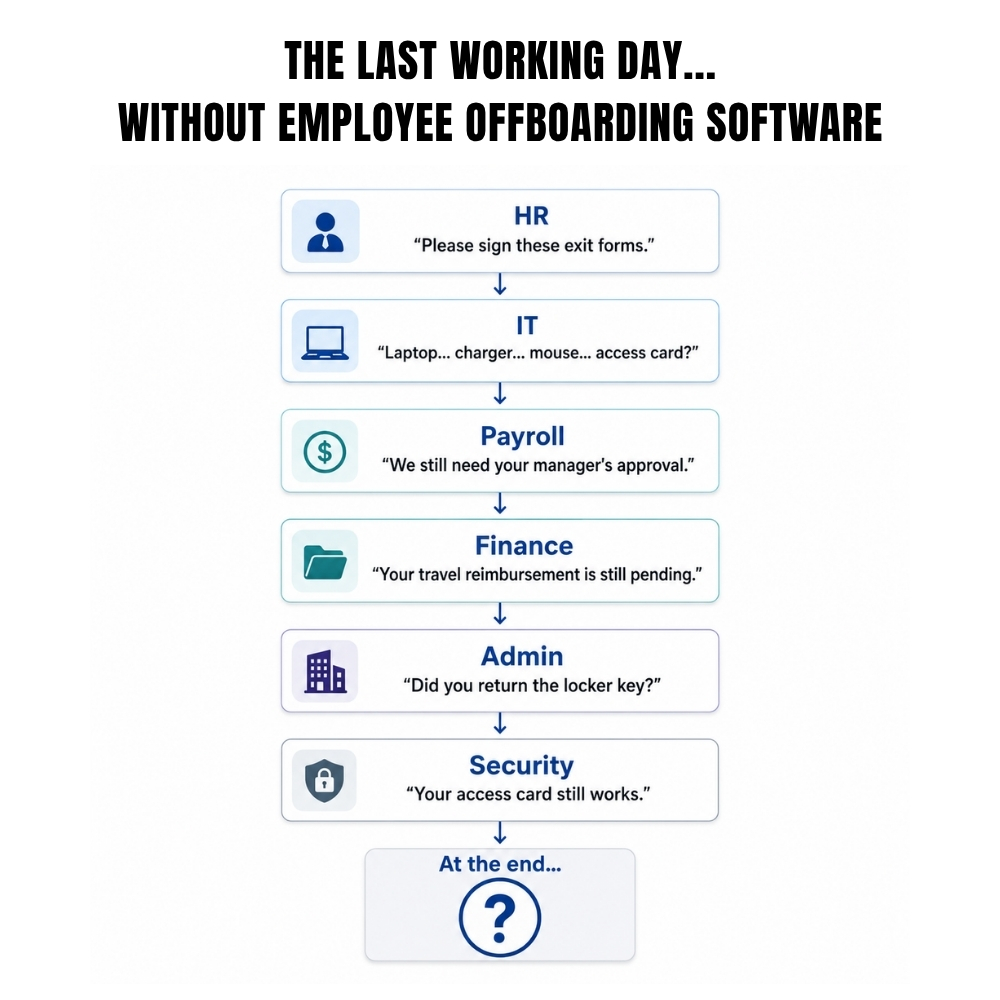
For many organizations, the process becomes surprisingly unorganized.
Someone reminds the employee to return a laptop.
Payroll receives a last-minute email about Full & Final Settlement.
IT is informed to deactivate accounts only after the employee's last working day.
HR searches for company assets, missing documents, and pending approvals.
Meanwhile, the departing employee keeps asking the same question:
"What happens next?"
This is where many organizations unknowingly damage the exit experience of an employee. A professional goodbye should be just as organized as a professional welcome.
The employee, meanwhile, is left wondering:
What is happening now?
This is where the last impression of the company is formed.
A professional exit should not feel like an employee is being quietly removed from the organization. It should feel structured, respectful, clear, and complete.
That is why employee offboarding software is becoming an important part of the employee lifecycle.
It helps companies manage the entire employee exit process through one organized system rather than relying on scattered emails, spreadsheets, handwritten notes, and verbal follow-ups.
A good exit protects company data, assets, payroll records, and operational knowledge. It also helps the departing employee leave with clarity and dignity.
Because how a company says goodbye says a lot about how it treats people.
What Is Employee Offboarding?
Employee offboarding is the formal process followed when an employee leaves a company. It starts with voluntary resignation, retirement, termination, transfer, or contract completion is confirmed. Hence, it ends when all exit activities are completed. These activities may include:
- Resignation acceptance
- Notice-period tracking
- Knowledge transfer
- Asset return
- Departmental clearance
- System-access removal
- Exit interview
- Final payroll
- Full and Final Settlement
- Relieving and experience documents
- Employee record closure
A proper employee exit process ensures that none of these activities are forgotten. Without structure, employee exits become dependent on memory.
- One HR executive remembers to inform payroll.
- Another forgets to notify IT.
- A manager assumes the laptop was returned.
- Finance is unaware of a pending reimbursement.
- The employee follows up repeatedly for the relieving letter.
This is exactly what employee offboarding software is meant to prevent. It brings tasks, approvals, documents, clearances, communication, and status updates into a single process.
Offboarding Is Not Always the Same: Types
Every employee does not leave for the same reason. However, companies should not treat every exit as one identical checklist.
1. Voluntary Resignation
It happens when an employee chooses to leave. They may have accepted another job, decided to study, relocated, started a business, or simply wanted a change. This type of exit usually involves a notice period, handover, clearance, exit interview, final payroll, and documentation.
2. Retirement
Retirement often requires more preparation because the employee may have spent several years with the organization. Knowledge transfer becomes especially important. The organization may also need to manage retirement benefits, service records, gratuity, and formal recognition.
3. End of Contract
Fixed term or contract employees leave when the agreed employment period ends. The offboarding checklist may include contract review, final payments, access removal, asset return, and completion of documents.
4. Termination
Termination may happen because of performance, misconduct, restructuring, redundancy, or business closure. This type of exit needs careful documentation, controlled communication, security checks, and timely payroll compliance.
5. Internal Transfer
Sometimes an employee does not leave the organization but moves to another branch, department, legal entity, or business unit. The process may still require asset transfer, access updates, reporting changes, payroll changes, and record updates.
A flexible exit management software system should support different workflows for different types of exits rather than forcing every employee through one rigid process.
Employee Mindset During Offboarding
Companies usually look offboarding as an administrative task. The employee sees it differently.
For them, leaving can involve excitement, uncertainty, relief, disappointment, anxiety, or a combination of all five. Even employees who resign happily may worry about:
- Whether their final salary will be correct
- When they will receive their relieving letter
- Whether unused leave will be included
- Who will approve pending expenses
- Whether they need to return every asset before the last day
- Whether their manager will provide a reference
- Whether the company will delay their documents
- Whether their exit interview will affect future opportunities
This is why the tone matters. The employee exit process should not become cold simply because someone has resigned.
A respectful company explains the steps, timelines, documents, responsibilities, and final payments clearly.
The employee should not need to chase five departments to understand what is happening. Employee offboarding software helps create that clarity by showing tasks, approvals, pending actions, and completion of status in one place.
Different Mindset Companies Need
A common workplace reaction to resignation is:
“They are leaving anyway.”
That mindset creates poor exits. The better mindset is:
“They worked here, contributed here, and deserve a professional closure.”
A departing employee may become:
- Future customer
- Client contact
- Returning employee
- Source of referrals
- Public reviewer of the company
- Voice in the professional community
Disorganized goodbye can undo years of goodwill. However, a professional goodbye can preserve the relationship even after employment ends.
That is why exit management software should not only protect the organization. It should also support a respectful employee experience.
Why Manual Employee Offboarding Fails
Manual exits usually depend on a spreadsheet or printed offboarding checklist.
At first, that seemed practical. But offboarding involves several departments.
- HR manages records and documents.
- Managers handle knowledge transfer.
- IT removes system access.
- Administration collects assets.
- Finance closes expenses.
- Payroll prepares final payments.
- Security removes entry access.
One checklist cannot complete all these tasks by itself. Someone still must:
- Send reminders
- Follow up with departments
- Check completion
- Update status
- Escalate delays
- Inform the employee
- Store documents
The more employees and locations a company has, the more likely something will be missed.
Step-by-Step Process of Employee Offboarding Software
HR HUB supports offboarding through a centralized process that connects employee records, workflows, clearances, asset returns, exit interviews, payroll activities, and documentation. Here is a practical five-step flow.
Step 1: Start the Exit Request
The process begins when the resignation, retirement, termination, contract completion, or transfer is recorded. HR should capture:
- Exit type
- Resignation date
- Notice period
- Expected last working day
- Reason for exit
- Reporting manager
- Applicable approvals
With employee offboarding software, the exit request becomes the starting point for the full workflow. There is no need to create separate emails for payroll, IT, administration, and finance. The system can begin assigning the relevant actions.
Step 2: Start Clearance and Asset Recovery
Once the exit is confirmed, departments need to check what remains pending. This can include:
- Laptop
- Mobile device
- ID card
- Access card
- Keys
- Uniform
- Tools
- Documents
- Company credit card
- Pending expenses
- Loans or advances
- Department approvals
This is where employee clearance software becomes useful. HR HUB’s clearance workflow helps coordinate departmental signoffs and asset returns while maintaining an organized exit record. Instead of asking every department separately, HR can see which clearance is pending.
Step 3: Manage Knowledge Transfer
The employee may be leaving, but their knowledge should not leave without a handover. Managers should identify:
- Current responsibilities
- Open projects
- Pending tasks
- Client contacts
- Important documents
- Password ownership
- Process knowledge
- Reporting obligations
- Replacement or backup person
A good offboarding checklist should include clear handover ownership and deadlines. HR HUB supports transition management so responsibilities, documents, and project information can be transferred before the employee’s last day. This reduces disruption after the employee leaves.
Step 4: Complete Exit Interview and Final Payroll
The exit interview should not feel like an interrogation. Its purpose is to understand the employee’s experience. Useful topics include:
- Why they are leaving
- What worked well
- What frustrated them
Their relationship with management
- Workload
- Growth opportunities
- Compensation
- Company culture
What might have made them stay? Would they consider returning? HR HUB supports automated exit interviews and surveys, so companies can collect feedback consistently and identify workplace improvement areas.
At the same time, payroll should review:
- Salary through the last working day
- Unused leave treatment
- Bonuses or incentives
- Pending deductions
- Reimbursements
- Loans or advances
- Gratuity, where applicable
- Full and Final Settlement
- Payslip and settlement statement
An effective exit management software system should make these activities visible rather than leaving payroll to discover the exit at the last minute.
Step 5: Close Access, Documents, and Records
On or before the last working day, the company should complete the final closure. It will include:
- Email access removal
- Software access removal
- VPN closure
- Entry access removal
- Document issuance
- Relieving letter
- Experience letter
- Final payslip
- Settlement documents
- Exit acknowledgment
- Employee record update
Employee lifecycle management software helps maintain these actions as part of one exit record. HR HUB also supports organized record keeping, helping companies preserve exit documentation and compliance history.
Questions Employees Commonly Ask During Offboarding
Employees often ask practical questions that companies should answer before they need to ask twice.
“When will I receive my final settlement?”
Give a clear expected timeline and explain which clearances affect processing.
“Will my unused leave be paid?”
Explain the applicable company policy and how the balance will be handled.
“When will I get my relieving and experience letters?”
Share the document timeline and whether completion depends on clearances.
“What assets do I need to return?”
Provide a complete list instead of asking employees to remember every item issued over the years.
“What happens to my insurance and benefits?”
Explain when coverage ends and whether any continuation options exist.
“Who should I contact after my last day?”
Give one HR contact for settlement, payroll, tax, and document questions.
“Can I apply here again?”
A professional answer keeps the relationship open unless company policy says otherwise.
“Will my exit interview remain confidential?”
Explain how the feedback will be handled and who can access it.
These questions should form part of the offboarding checklist. Clear answers reduce uncertainty and repeated follow-ups.
Best Practices for Professional Employee Offboarding
Start Early
Do not wait until the last working day. Begin the employee exit process as soon as the exit is confirmed.
Assign Clear Ownership
Every task should have one responsible person. “IT will handle it” is not enough. Name the person or team responsible.
Set Deadlines
Knowledge transfer, asset return, payroll review, and document preparation should have clear due dates.
Keep the Employee Informed
Employees should know what is complete, what is pending, and what they need to do next.
Use One Offboarding Checklist
Do not let every manager invent a different process. A standardized offboarding checklist creates consistency.
Protect Access and Data
System access should be reviewed and removed according to the employee’s last working date and company security rules.
Collect Feedback Respectfully
Exit interviews work best when employees feel safe to answer honestly.
Track Every Clearance
Employee clearance software should show which department has completed its review and which action is still pending.
Keep Records Organized
Resignation, clearance, settlement, interview, and final documents should remain connected to the exit record.
Review Exit Trends
Use exit management software reports to identify common reasons for resignation, delayed clearances, settlement bottlenecks, and recurring department issues.
How HR HUB Helps Companies Say Goodbye Professionally
HR HUB helps companies manage employee exits through a connected offboarding process. It brings together:
- Employee Information
- Exit workflows
- Department clearances
- Asset returns
- Knowledge transfer
- Exit interviews
- Payroll activities
- Documents
- Compliance records
With employee offboarding software, HR teams can track each exit from resignation to final closure.
Managers know what they need to hand over. Departments know which clearances they need to complete. Payroll receives the required exit information. Employees receive clearer updates. HR gets one view of the entire employee exit process.
The result is fewer follow-ups, fewer missing tasks, and a more professional exit experience.
Give Every Employee Journey a Proper Ending
The final days of employment should not feel confusing.
An employee should not spend their last week chasing documents, asking about settlement, or reminding departments that they are leaving.
The company should not discover unreturned assets or active system access weeks later.
A well-managed exit protects the organization and respects the employee. That is what employee offboarding software should help companies achieve.
HR HUB brings workflows, clearances, assets, employee records, payroll, documents, and exit feedback into one structured process. Your company planned their first day carefully. Their last day deserves the same attention.