Every HR team knows this story.
An employee applies for leave. The manager sees the request and thinks, “I’ll approve it after this meeting.” Then another meeting begins. Then a client call happens. Then lunch arrives. Then the day ends.
By the next morning, the employee is asking HR for an update. HR checks the system. The request is still pending. Payroll cutoff is closed. Attendance records are waiting. The manager says, “Oh, I thought I approved that.”
And just like that, one small, missed approval has invited three extra follow-ups, one confused employee, and an HR person wondering why coffee does not come with emotional support.
This is exactly where an HR notification system becomes useful. Not as a fancy feature. Not as another bell icon sitting in the corner. It becomes a quiet helper that reminds the right person at the right time, before a small delay becomes a full workplace drama.
In modern workplaces, approvals move through multiple people. Leave requests, attendance corrections, payroll inputs, shift changes, onboarding documents, performance reviews, expense claims, role changes, policy acknowledgements, and exit formalities all depend on someone taking action on time.
When that action is missed, work slows down.
When notifications are done properly, work keeps moving.
Why HR Delays Usually Start Small Without an HR Notification System
Most HR delays do not begin with a major mistake. They begin with everyday busyness.
A manager may miss approval because they are handling team targets. An employee may forget to submit a document because they are new and still figuring things out. HR may miss a pending action because there are fifty other tasks waiting. Finance may not process something because approval never reached them.
Nobody wakes up thinking, “Today I will delay the entire leave process.” But somehow, it still happens.
That is because HR workflows are connected. One missed step can affect another.
- A pending leave request can affect attendance.
- An attendance correction can affect payroll.
- A delayed overtime approval can affect salary processing.
- A missing document can delay onboarding.
- A forgotten policy acknowledgement can affect compliance records.
- A skipped exit clearance can affect asset recovery.
This is why employee alerts are not just reminders. They are small signals that protect bigger processes from getting stuck.
What an HR Notification System Really Does for Daily HR Workflows
An HR notification system sends alerts whenever an employee, manager, HR admin, or approver needs to know something or take action.
That may sound simple, but the real value lies in timing and context.
A basic notification says, “Something happened.”
A useful HR notification says, “Something happened, it needs your attention, and here is what you should do next.”
For example:
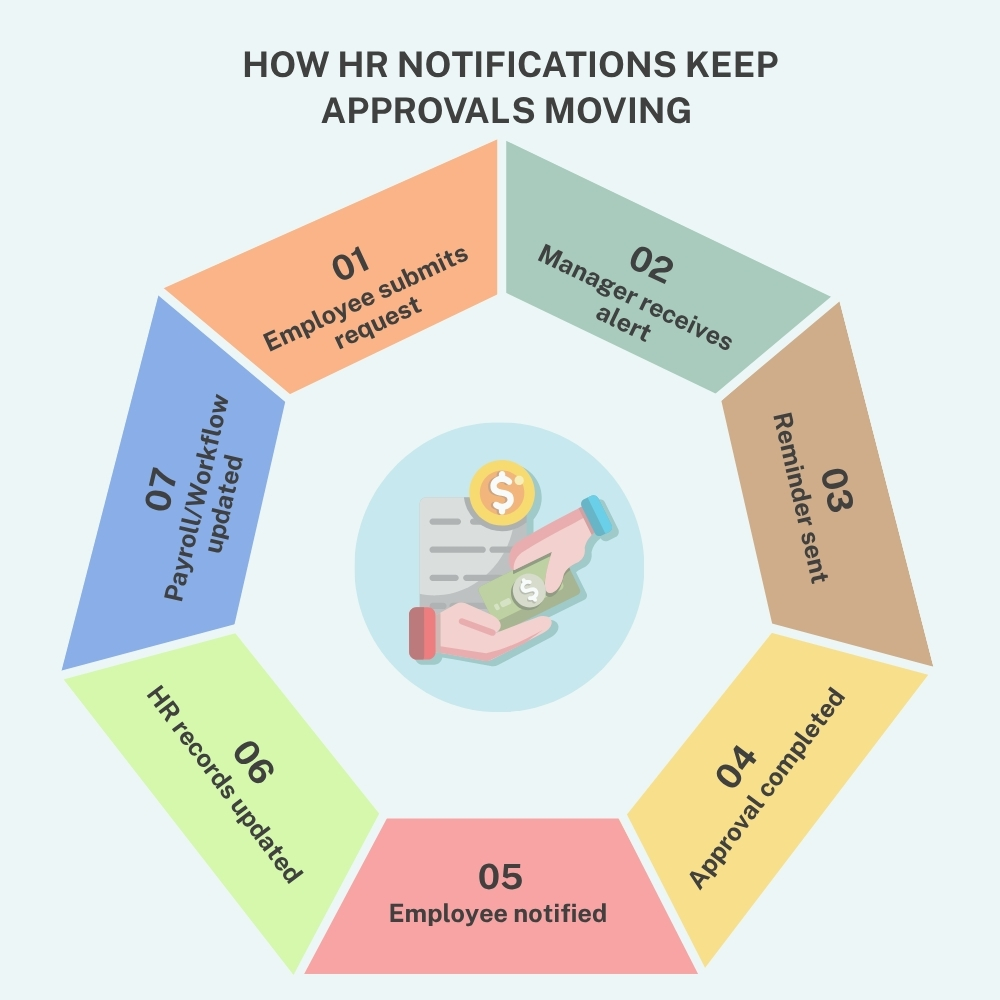
- An employee submits a leave request.
- The manager receives an approval alert.
- The employee receives confirmation that the request has been submitted.
- If the manager does not act, the system sends a reminder.
- Once approved or rejected, the employee receives an update.
- HR can track the status without manually asking everyone.
That is the difference between scattered communication and organized communication.
The best part is that HR alerts can support different areas of HR, including leave, attendance, payroll, onboarding, recruitment, performance, training, document management, policy acknowledgement, and employee self-service.
In other words, it helps HR stop chasing people like a detective in a workplace mystery.
The Real Workplace Problem: When Employee Alerts and Requests Get Lost in the Middle
The Employee Thinks HR Has It
The employee submits a request and assumes HR is handling it. From their side, the job is done.
But sometimes the request is waiting with the reporting manager. Sometimes it is waiting with the department head. Sometimes it needs an HR review. Sometimes it needs finance approval. The employee may not know where it is stuck, so they simply wait.
And waiting without updates is where frustration begins.
The Manager Thinks They Will Check It Later
Managers often receive multiple tasks in a day. Client work, internal meetings, team questions, reporting, project updates, and approval requests all compete for attention.
If HR approvals are not highlighted properly, they easily slip to the bottom of the list.
Not because the manager does not care. Because the manager is human. And humans are very good at forgetting things they said they would do “in five minutes.”
HR Gets Pulled into Manual Follow-Ups
When requests are not moving, employees come to HR. Then, HR checks the status. Then HR messages the manager. Then HR reminds the employee. Then HR updates the spreadsheet, report, or payroll team.
That is a lot of work for something that a timely notification could have been handled earlier.
Workflow notifications reduce this back-and-forth by keeping every person aware of their pending action.
How Workflow Notifications Keep HR Approvals Moving Without Manual Chasing
Workflow notifications are especially useful when a process has more than one approval level.
Let’s take a simple example.
An employee applies for overtime approval. The request first goes to the reporting manager. After that, it goes to HR. Then it may go to payroll for processing.
Without notifications, the request may get stuck at any stage. The employee may think the manager has approved it. The manager may think HR has received it. HR may not even know it is pending.
With workflow notifications, every stage is clearly communicated.
- The manager gets an alert when action is needed.
- HR gets an alert once the manager approves it.
- Payroll gets cleaner approved data.
- The employee gets status updates.
- If the request is delayed, reminders can be sent.
This creates a clear flow. No guess. No hidden pending items. No “I thought someone else was handling it.”
That one sentence alone has caused enough workplace confusion to deserve its own policy document.
How Employee Alerts Make HR Processes Feel More Transparent
Employees do not always expect instant approval. But they do expect clarity.
When an employee applies for leave, submits a document, raises an attendance correction, or requests a shift change, they want to know what is happening. Silence creates doubt.
- Was my request submitted?
- Did my manager see it?
- Is HR reviewing it?
- Was it approved?
- Do I need to change anything?
Employee alerts answer these questions without forcing the employee to send follow-up messages.
This improves employee experience in a very practical way. People feel informed. They know where things stand. They do not have to keep asking HR for basic updates.
This is especially helpful for time-sensitive requests, such as:
Leave Before Travel
When an employee is planning to travel, a pending leave request can create stress. A timely alert helps the manager act faster and gives the employee peace of mind.
Attendance Corrections Before Payroll
If an employee forgets to punch in or out, the correction needs approval before payroll processing. HR alerts help make sure the correction does not sit unattended.
Document Submission During Onboarding
New employees already have enough to understand. A clear reminder helps them submit documents, complete forms, and follow joining steps without confusion.
Policy Acknowledgement Deadlines
When companies release updated policies, employee alerts help ensure people read and acknowledge them on time. This is useful for compliance and internal records.
How HR Alerts Reduce the Daily Follow-Up Burden for HR Teams
Ask any HR person for what consumes more time than expected, and follow-ups will probably make the list.
- “Please approve this request.”
- “Please submit this document.”
- “Please review this correction.”
- “Please confirm this update.”
- “Please do it today because payroll is closing.”
At some point, HR starts sounding less like a department and more like a polite reminder machine.
HR alerts reduce that pressure. The system sends reminders automatically based on configured rules. HR can still monitor everything, but they do not have to manually chase every single action.
This gives HR more time to focus on meaningful work, such as employee support, process improvement, compliance readiness, workforce planning, and better employee communication.
For growing businesses, this matters even more. Manual follow-ups may work when there are 20 employees. They become painful when there are 200. And when there are multiple offices, countries, departments, or shift teams, manual reminders are simply not enough.
If your team still depends on spreadsheets, chats, and manual reminders to manage approvals, you may also want to read our detailed guide on the hidden cost of manual HR and where businesses lose time daily
How HR Notifications Help Managers Take Action Faster
Managers are often the key approvers in HR workflows. They approve leave, attendance corrections, shift changes, overtime, performance inputs, expense requests, and sometimes role or access changes.
But the managers are also busy.
A strong HR notification system helps them by making pending actions visible. Instead of logging in repeatedly to check requests, they receive timely alerts when something needs attention.
Good HR alerts should tell managers:
- What the request is
- Who raised it
- When it was submitted
- What action is required
- Whether it is urgent
- What happens next
This saves time and reduces confusion. It also helps managers avoid becoming the reason a process is delayed.
Nobody wants to be the person holding up payroll. That is not a fun title.
Why Payroll and Attendance Depend on Timely HR Alerts
Payroll is one of the clearest examples of why notifications matter.
Payroll teams depend on accurate inputs. Attendance of corrections, leave approvals, overtime approvals, unpaid leave, shift changes, and holiday work records all need to be reviewed before salary processing.
If approvals are delayed, payroll may be processed with incomplete data. That can lead to wrong salary calculations, adjustment requests, employee dissatisfaction, and extra work in the next cycle.
An HR notification system helps prevent this by reminding approvers before cutoff dates. HR can send alerts for pending attendance requests, unapproved overtime, incomplete leave approvals, and payroll-linked tasks.
This helps payroll teams work with better data. It also reduces last-minute panic.
Because payroll week is already intense enough. It does not need surprise pending approvals to jump out like plot twists.
How Workflow Notifications Support Compliance and Audit Readiness
HR is not only about people and processes. It is also about records.
Many HR activities need proof. Who approved the request? When was it approved? Was the employee notified? Was the policy acknowledged? Was the document submitted before the deadline?
This matters for audits, compliance checks, payroll reviews, ISO documentation, internal governance, and management reporting.
Workflow notifications help create a clearer action trail. HR can see what was sent, who received it, what action was taken, and where a request is pending.
This is useful for:
- Leave approval records
- Payroll adjustment approvals
- Attendance correction records
- Policy acknowledgement tracking
- Role change approvals
- Onboarding document follow-ups
- Training completion reminders
- Exit clearance steps
- Asset return reminders
- Performance review submissions
When notifications are connected to workflows, HR gains better visibility and stronger records. That means fewer blind spots and fewer awkward “we will check and get back to you” moments during reviews.
How Employee Alerts Make Onboarding Smoother and Less Confusing
Onboarding is full of small but important steps.
A new employee may need to submit identity documents, fill out forms, sign policies, complete profile details, review company information, attend induction, and connect with their manager or buddy.
HR also needs to prepare access, confirm joining details, assign tasks, share reminders, and track completion.
Without employee alerts, onboarding can feel confusing. The new hire may not know what to do next. HR may not know what is pending. The manager may forget to prepare for the team.
- A notification-based onboarding process makes everything easier.
- The new hire receives reminders for pending tasks.
- HR receives alerts when documents are submitted.
- Managers receive joining reminders.
- Employees receive updates when steps are completed.
This makes digital onboarding feel more organized and less dependent on manual checking.
A good first impression matters. Nobody wants their first week to begin with, “Did you get the form I forgot to send?”
Why Remote, Hybrid, and Multi-Location Teams Need Better HR Alerts
When everyone worked in the same office, HR could walk over to someone and say, “Please approve this today.”
That still worked, mostly because escape was difficult.
Now teams are spread across cities, branches, countries, time zones, remote setups, client locations, field sites, and shift schedules. A casual desk reminder does not work when the approver is in another office or another country.
For companies operating in India, the Cayman Islands, the US, and Canada, this becomes even more relevant. HR teams may need to coordinate across locations, departments, legal rules, work patterns, and reporting structures.
HR alerts help create consistency. Whether the employee is in the office, working remotely, on a shift, or based in another location, the right person still receives the right update.
This helps HR communication stay structured even when teams are not physically together.
Why the Best HR Notifications Are Clear, Useful, and Not Annoying
There is one important thing to remember. More notifications do not always mean better communication.
If the system sends too many alerts, people may stop paying attention. A notification should not feel like a mosquito near the ear.
A useful HR notification system should allow HR teams to decide:
- Which actions need alerts
- Who should receive them
- When reminders should be sent
- When a delay should be escalated
- Which notifications should be urgent
- Which updates should stay simple
For example, a payroll cutoff reminder may need higher priority. A birthday notification can be lighter. A pending attendance correction may need a reminder after one day. A policy acknowledgement may need repeated reminders until completion.
The goal is not to make noise. The goal is to guide action.
Common HR Alerts Every Company Should Use to Avoid Delays
A well-planned notification setup should cover the processes that often create delays.
Leave Request Alerts
Managers should receive alerts when employees apply for leave. Employees should receive updates when the request is approved, rejected, or sent back.
Attendance Correction Alerts
If an employee requests a correction for missed punches, late marks, or incorrect hours, the approver should receive a prompt notification.
Overtime Approval Alerts
Overtime should be approved before payroll processing. Notifications help managers and HR review them on time.
Shift Change Alerts
Shift updates affect attendance, scheduling, and workforce planning. Alerts help employees and managers stay aware of changes.
Payroll Cutoff Reminders
Payroll-linked approvals should not wait until the last moment. Timely HR alerts help reduce correction work.
Document Expiry Alerts
Work permits, licenses, contracts, certificates, and compliance documents may have expiry dates. Alerts help HR act before the deadline.
Policy Acknowledgement Alerts
When employees need to read and accept a policy, reminders help improve completion rates.
Onboarding Task Alerts
New employees and HR teams can stay on track with document, form, and join task reminders.
Exit Clearance Alerts
Exit processes involve assets, access removal, final settlement inputs, and approvals. Notifications help avoid last-minute gaps.
How Workflow Notifications Build Accountability Without Creating Pressure
Accountability sounds serious, but in HR workflows, it simply means everyone knows what they need to do.
When a request is pending, HR should be able to see where it is waiting. Is it with the manager? HR admin? Finance? Department head? Employee?
Workflow notifications create this clarity.
This does not mean blaming people. It means removing confusion. When everyone knows their part, the process moves faster.
It also helps managers and employees become more responsible with approvals and submissions. Pending tasks stays visible. Delayed actions are easier to identify. HR does not have to guess what went wrong.
And when there is less guessing, there is less frustration.
Why an HR Notification System Matters More Than Ever
Today’s HR teams are expected to be fast, accurate, compliant, and employee-friendly at the same time. That is not a small question.
- Employees want quick updates.
- Managers want less admin to work.
- Payroll teams want accurate inputs.
- Leadership wants clear reports.
- Auditors want proper records.
- HR wants one peaceful day without chasing approval.
An HR notification system helps connect all these expectations. It keeps important tasks visible, supports timely action, and reduces the chances of delays silently growing in the background.
- For small businesses, it brings structure.
- For growing companies, it reduces manual work.
- For larger organizations, it supports stronger process control.
- For employees, it makes HR feel more responsive.
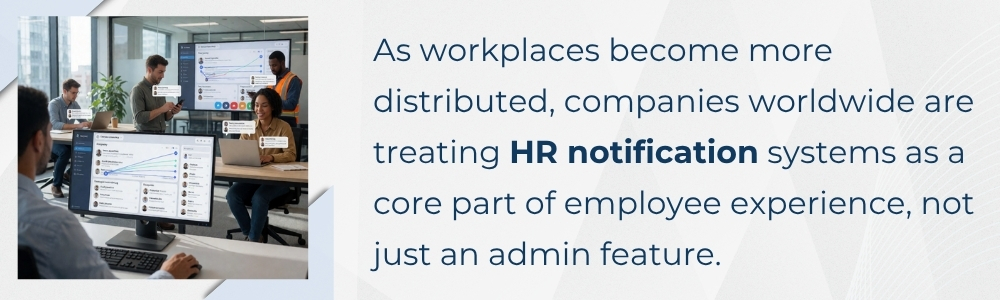
The Approval Bell: How HR HUB Keeps HR Alerts and Workflows Moving
Missed approvals may look small, but they can affect leave planning, payroll accuracy, attendance records, compliance tracking, onboarding, employee trust, and HR productivity. When requests are scattered across emails, chats, spreadsheets, or memory, delays become almost unavoidable.
A strong HR notification system changes that. It keeps tasks visible. It reminds the right people. It supports workflow notifications across approval stages. It helps employees stay informed through timely employee alerts. It gives HR teams better control without forcing them to manually follow up on every small action.
HR HUB helps organizations manage HR alerts across key HR processes such as leave, attendance, payroll, onboarding, policy acknowledgement, role changes, employee self-service, and workflow approvals. With HR HUB, teams can track pending actions, send timely notifications, reduce approval delays, and keep important HR processes moving with better clarity.
Because in HR, the best notification is not the loudest one. It is the one that arrives before someone must ask, “Any update on this?”