A basic shift changes creates confusion.
A shift may look simple on paper.
One employee works from 9 AM to 5 PM. Another covers the evening. A manager adjusts the weekend roster. Someone swaps a shift. Someone else stays back for two extra hours. Then one more employee says their shift was cut without enough notice.
Suddenly, the schedule is not simple anymore.
For many businesses, cut shift conflicts and overtime issues do not start because managers are careless. They often start because schedules are managed through spreadsheets, WhatsApp messages, paper rosters, and last-minute conversations. One change is made in one place, but not updated everywhere else. One employee is informed, but payroll is not. One shift is reduced, but the reason is not recorded.
That is where workforce scheduling software becomes more than a planning tool. It becomes a clear record of who was scheduled, who worked, who changed the shift, who approved it, and how it should affect attendance and payroll.
For growing businesses, especially those with multiple shifts, hourly teams, weekend coverage, or overtime rules, workforce scheduling software can help reduce confusion, protect employees, and give managers better control over daily staffing.
When a Cut Shift Turns Into a Bigger Workplace Problem
A cut shift happens when an employee’s scheduled hours are reduced. It may happen because business is slow, customer bookings are cancelled, staffing demand changes, or the manager needs to control labor cost.
But here is the problem.
If the shift was already published, employees may have planned their day around it. They may have arranged transport, childcare, or other personal commitments. When a shift is cut without a clear record, employees may ask questions like:
- “Why was my shift reduced after it was already scheduled?”
- “Will I still be paid for the hours that were removed?”
- “Who approved the change in my roster?”
- “Why did someone else get overtime while my shift was cut?”
- “How do I know the final schedule is the correct one?”
These questions are not small. They affect trust.
When there is no proper employee scheduling software, these issues become harder to explain. Managers may say one thing. Employees may remember another thing. Payroll may receive different data. HR may not know what actually happened.
This is why clear employee shift management matters. A business should know when a shift was created, when it was edited, who changed it, and whether the employee was notified.
Overtime Conflicts Start When Schedules Are Not Clear
Overtime can be a sensitive topic. Employees want to be paid fairly for extra hours. Managers want to control labor cost. Payroll wants accurate records. HR wants compliance and transparency.
But overtime conflicts happen when the schedule and actual attendance do not match clearly.
For example:
- An employee is scheduled until 6 PM but works until 8 PM.
- A staff member covers for someone who was absent.
- A manager asks an employee to stay back during rush hours.
- A shift is extended verbally but not updated in the system.
- An employee works on a weekly off or holiday.
Without shift scheduling software, it becomes difficult to confirm whether the extra hours were planned, approved, accidental, or disputed. That is when overtime turns into confusion.
A good staff scheduling software setup helps businesses avoid this problem by keeping schedules, attendance, approvals, and payroll inputs connected. Managers can review planned hours against actual hours. HR can see where overtime is happening. Payroll can process records with fewer manual corrections.
Why Manual Scheduling Creates More Conflict Than Control
Manual schedules may work when the team is small. But as the business grows, manual planning becomes risky.
- A spreadsheet does not always show who changed the roster.
- A WhatsApp message can be missed.
- A paper schedule can be outdated.
- A manager may forget to update payroll.
- An employee may work according to an old version of the schedule.
This is where workforce management software becomes very useful. It brings structure to daily workforce planning. Instead of depending on memory and scattered messages, businesses get a cleaner way to manage shifts, attendance, approvals, and exceptions.
With employee scheduling software, managers can plan shifts in advance. With shift scheduling software, they can manage different timings, weekly offs, and shift changes. With staff scheduling software, they can see who is working, who is unavailable, and where staffing gaps may appear.
And with proper employee shift management, employees get more clarity about their assigned hours.
The Real Cost of Cut Shift and Overtime Conflicts
Cut shifts and overtime conflicts do not only affect payroll. They affect the workplace's mood.
- Employees may feel they are not being treated fairly.
- Managers may spend too much time explaining schedule changes.
- HR may receive complaints that could have been avoided.
- Payroll may need repeated corrections.
- Business owners may lose visibility on labor costs.
The biggest issue is that these conflicts create doubts.
If employees do not trust the schedule, they start questioning every change. If managers do not trust attendance records, they start checking everything manually. If payroll does not trust the final hours, salary processing becomes stressful.
This is why workforce scheduling software helps. It creates one source of truth for planned shifts, actual attendance, shift changes, overtime, and approvals.
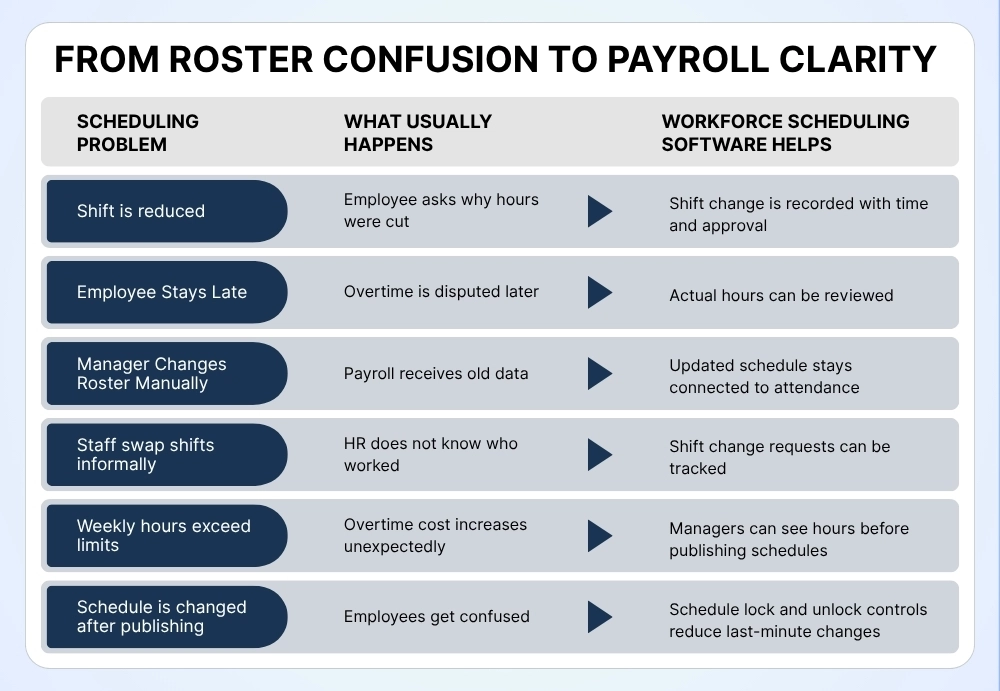
How Workforce Scheduling Software Makes Shift Records Clear
The main benefit of workforce scheduling software is visibility.
Managers can see the schedule before publishing it. Employees can see assigned shifts. HR can review changes. Payroll can use approved data. Business owners can understand labor costs.
This reduces the chance of arguments because the system keeps a record.
For example, if a shift was cut, the system can show when the change happened. If overtime was worked, attendance can be compared with the scheduled hours. If an employee requested a shift change, the approval flow can be tracked.
This is much stronger than saying, “I think the schedule was changed last week.”
With workforce management software, the business does not need to depend only on memory. It can depend on the records.
Employee Scheduling Software Helps Managers Plan Better
Good scheduling is not just about filling empty slots. It is about matching the right people with the right hours.
Employee scheduling software helps managers plan shifts based on availability, role, workload, business hours, weekly offs, and expected demand. It helps them avoid overstaffing on slow days and understaffing on busy days.
For example, a hospitality business may need more staff during breakfast and dinner hours. A retail store may need more coverage on weekends. A clinic may need specific staff for certain service hours. A manufacturing team may need rotational shifts.
When managers use employee scheduling software, they can plan these needs more carefully instead of making last-minute adjustments.
This also reduces cut shift issues because managers can review staffing needs before publishing the roster.
Shift Scheduling Software Helps Reduce Last-Minute Changes
Last-minute schedule changes are one of the biggest reasons employees get frustrated.
- A shift gets moved.
- A day off has changed.
- An employee is asked to come early.
- Someone is told not to report after already preparing for work.
Shift scheduling software helps reduce these problems by making shift planning more structured. Managers can create schedules, review coverage, assign employees, and publish shifts clearly.
If changes are required, the system can help record them properly. This is important because not every shift change is wrong. Sometimes changes are necessary. The real issue is when changes happen without clear communication or approval.
With shift scheduling software, businesses can create a better process for shift updates, lock schedules when needed, and maintain proper records.
Staff Scheduling Software Supports Fair Work Distribution
Employees notice patterns.
They notice who gets weekend shifts. They notice who gets overtime. They notice who gets more hours and who gets cut often. If schedules are not transparent, these patterns can create workplace tension.
Staff scheduling software gives managers a better way to distribute work fairly. It helps them review who has already worked enough hours, who is available, who has approved leave, and who may be overloaded.
This does not mean every employee will always get the exact same hours. Business needs may differ. But staff scheduling software helps managers make decisions based on data, not guesswork.
It also gives HR better visibility when employees raise questions about fairness.
Workforce Management Software Connects Scheduling With Payroll
One of the biggest mistakes businesses make is treating scheduling and payroll as separate processes.
- The schedule says one thing.
- Attendance shows another.
- Payroll receives a third version.
This is where conflicts begin.
Workforce management software helps connect scheduling, attendance, overtime, leave, and payroll. When the system knows planned hours and actual hours, it becomes easier to identify extra time, missed punches, absences, cut shifts, and exceptions.
This makes payroll more accurate and reduces repeated corrections.
For businesses with hourly workers, rotating shifts, overtime rules, weekly offs, or multiple locations, workforce management software can make a major difference.
Employee Shift Management Builds Trust
Employees do not expect every schedule to be perfect. But they do expect clarity.
They want to know when they are working. They want to know if their shift changes. They want to know whether overtime will be counted. They want confidence that payroll will match approved hours.
That is why employee shift management is important.
Good employee shift management helps businesses manage assigned shifts, shift change requests, approvals, attendance records, and payroll inputs in a more transparent way.
It also helps employees feel more informed. When employees can see their shifts and changes clearly, they are less likely to feel ignored or confused.
Stop Shift Conflicts Before Payroll Starts
Ready to make scheduling clearer?
Scheduling should not become a payroll headache.
HR HUB helps businesses manage rosters, shift changes, attendance, overtime records, and payroll-ready workforce data in one connected place. So when an employee asks why a shift changed or how overtime was counted, your team has a clear answer ready.
With HR HUB, every shift is easier to track, every change is easier to explain, and every payroll cycle becomes easier to trust.
Frequently Asked Questions
Q1. Why was my shift cut after the roster was already shared?
When business demand changes, bookings drop, or managers need to adjust staffing. But the real issue is not only the cut shift. The real issue is whether the change was recorded clearly. With workforce scheduling software, managers can track when the shift was changed, who changed it, and whether the employee was informed.
Q2. I stayed late. How will the company know it was overtime?
Good question. Overtime should not depend only on memory or verbal approval. When shift scheduling software connects with attendance, HR can compare your scheduled hours with your actual worked hours. This makes it easier to confirm whether the extra time should be counted as overtime.
Q 3. Why did someone else get overtime while my shift was reduced?
Sometimes overtime is based on skill, department needs, location coverage, or urgent business demand. Staff scheduling software helps managers review through the report that who was scheduled, who was available, who worked extra, and why the decision was made.
Q4. How do I know the final schedule is the correct one?
When schedules are shared through messages or spreadsheets, different versions can create confusion. Employee scheduling software helps keep the latest approved schedule in one place. Employees can check assigned shifts, updates, and changes without depending on old messages.
Q5. Will my payroll match the hours I worked?
Scheduling, attendance, and payroll should be connected. Workforce management software helps HR and payroll teams compare planned shifts, actual attendance, approved overtime, leave, and exceptions before salary processing from one system. It reduces manual errors and payroll disputes.
Q6. Can I request a shift change instead of calling my manager?
Yes, with proper employee shift management, employees can request shift changes through a structured process. Managers can review the request, approve or reject it, and keep the records available for HR and payroll. This avoids confusion caused by informal calls or chat messages.