How many times did your HR team ask, “Any update on this approval?” Last week?
- Five times?
- Twenty times?
- Maybe nobody is counting anymore.
An employee submits a request. The manager is busy. HR sends a reminder. The employee asks for an update. The manager finally approved it, but now another department needs to review it.
The request keeps moving, but only when someone pushes it forward.
That is the real problem with manual approval.
A leave request, attendance correction, employee document request, or shift change may take only a few minutes to review. Yet the complete process can take days because HR teams spend more time coordinating the approval than completing the actual work.
HR workflow automation changes this approach. Instead of relying on people to remember every request, send every reminder, and manually update every status, businesses can create structured workflows that keep employee requests moving from submission to completion.
The question is not whether your company has approval processes.
The real question is: How much time are those processes quietly taking from your HR team?
Why Do HR Approvals Take So Long?
Most approval delays begin with a simple question:
Who needs to approve this request?
The answer may seem obvious until the manager is on leave, the department head changes, the request exceeds a certain amount, or another approval level needs to be added.
Manual processes make these situations harder.
Consider an employee requesting overtime approval.
The employee emails the manager.
The manager forwards the request to HR.
HR checks the attendance record.
Finance needs to review the overtime cost.
The department head needs to provide final approval.
Meanwhile, the employee has no idea where the request is to sit.
Without a HR workflow automation software, every request depends on someone remembering the next step.
That is why HR teams often spend so much time chasing approvals.
The problem is not necessarily the people.
The problem is that the process depends too much on people remembering what to do next.
What Is HR Workflow Automation Software?
HR workflow automation is the use of technology to move HR requests, tasks, approvals, notifications, and records through predefined processes.
Instead of manually deciding where every request should go, the workflow follows configured business rules.
For example:
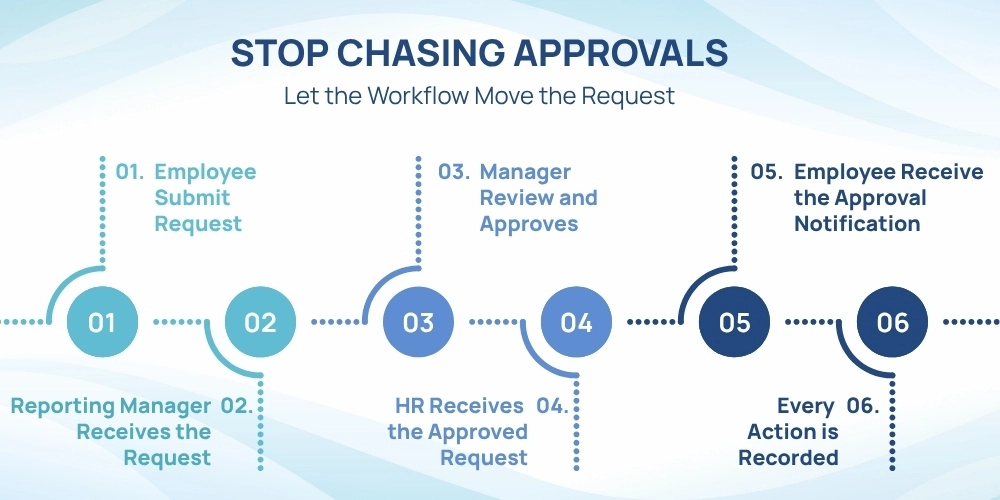
- An employee submits a shift change request.
- The request goes to the reporting manager.
- The manager approves it.
- HR receives the request for review.
- The employee receives a notification.
- The approved change is recorded in the system.
No repeated emails. No search through chat messages. No asking, “Who has my request now?” Good workflow automation software gives each person clear responsibility while keeping the request moving.
Which HR Process Automation Can Be Add?
Almost every HR department manages processes that involve requests, reviews, approvals, and notifications. Common examples include:
- Leave requests
- Shift change requests
- Attendance corrections
- Overtime approvals
- Employee document requests
- Loan requests
- Recruitment approvals
- Training requests
- Asset requests
- Expense-related HR approvals
- Employee information changes
- Offboarding clearances
- Payroll-related requests
Without HR process automation, each flow may follow a different path. One request is sent by email. Another is submitted through a spreadsheet. Someone sends a message to HR.
Another employee directly calls the manager. HR process automation creates a defined way to handle these requests. And even Employees Request Management helps them to submit them. Managers know what needs approval HR knows where each request stands.
Why Is Email Not Enough for Managing HR Approvals?
Email is useful for communication. But ask an inbox these questions:
- How many employee requests are pending right now?
- Which approvals are overdue?
- Which manager has the oldest pending request?
- How long does an average leave of approval take?
- Which requests were escalated last month?
- Who approved a payroll-related request six months ago?
The inbox will not answer easily. This is where approval workflow software becomes useful. The request is managed inside a structured system instead of living inside an email conversation.
- Employees can check their status.
- Managers can view pending approvals.
- HR can identify delayed requests.
- Completed requests maintain an activity history.
- Email and mobile notifications can still be used to alert people.
The difference is that the actual HR process workflow is no longer dependent on finding the right email.
What Happens When the Approver Goes on Leave?
Here comes one of HR’s favorite approval problems.
The manager is on vacation.
The employee submits an urgent request.
The request reaches the manager.
And then it waits.
The employee asks HR.
HR discovers that the manager will return in ten days.
Now what?
A structured workflow can support delegation. Approval responsibilities can be temporarily assigned to another authorized employee while the original approver is unavailable.
The company does not need to change the employee’s reporting structure or manually redirect every request. Managers should be able to take leave without taking the approval process with them.
What Should Companies Look for in Workflow Automation Software?
Not every system with an Approve button is good workflow automation software.
Companies should evaluate whether the software can handle real business situations.
- Configurable Approval Levels: Different requests may need different approval structures. The system should support single-level and multi-level approvals.
- Conditional Workflows: The approval path should be able to change based on company rules. For example, a request above a defined amount may require an additional approval level.
- Delegation: Approvals should continue when managers or other approvers are unavailable.
- Reminders and Escalations: The system should help identify delayed requests and trigger the appropriate next action.
- Employee Request Tracking: Employees should be able to view request status without repeatedly contacting HR.
- Notifications: Approvers and employees should receive relevant updates when action is required or the request status changes.
- Activity History: Important workflow actions should be recorded for future review.
- Role-Based Access: Employees, managers, HR teams, and administrators should only see requests and actions relevant to their responsibilities.
- Reports: HR teams should be able to review pending requests, approval delays, completed requests, and other workflow patterns.
- Connection with Other HR Processes: Leave approvals should connect with leave records. Shift changes should connect with schedules. Attendance corrections should connect with attendance data. Employee information requests should connect with employee records.
Connected HR process automation is more useful than simply converting paper forms into digital forms.
How Does Employee Request Management Reduce Repeated Questions?
Employees often contact HR because they cannot see what is happening. They submit a request. Then they wait.
- Was it received?
- Has the manager reviewed it?
- Does HR need additional information?
- Was it rejected?
- Is someone else reviewing it?
Good employee request management gives employees a clear place to submit requests and check their progress, especially when supported by an employee self-service portal. Employees may see statuses such as:
- Submitted
- Pending Approval
- Under Review
- Additional Information Required
- Escalated
- Approved
- Rejected
- Completed
This creates a simple but important change. Employees no longer need to ask HR for every update. They can check the request status themselves. HR teams receive fewer routine questions. Managers receive fewer repeated messages. Everyone has a clearer understanding of what is happening.
How Do You Know Your Company Needs HR Workflow Automation?
Ask your HR team these questions:
- Are pending approvals tracked in spreadsheets?
- Do employees submit the same type of request through different channels?
- Does HR repeatedly remind managers about approvals?
- Do employees frequently ask for request updates?
- Do requests stop when an approver is unavailable?
- Is there no clear escalation process?
- Is it difficult to find previous approval records?
- Does HR spend too much time coordinating routine requests?
If several answers are yes, your company may already have a workflow problem.
The number of employees is not the only factor. Complexity also increases with more departments, branches, managers, request types, approval levels, and business rules.
How Can HR HUB Help Businesses Stop Chasing Approvals?
A simple employee request should not require five emails, three reminders, and a spreadsheet entry to reach the right person.
HR HUB helps businesses manage employee requests through structured workflows, configurable approval levels, notifications, escalation rules, delegation, and request tracking.
- Employees can submit requests and view their status.
- Managers can see actions waiting for their attention.
- HR teams can monitor pending, approved, rejected, and escalated requests.
- Delegation can help keep workflows moving when approvers are unavailable.
- Notifications and reminders can help reduce unnecessary delays.
- Workflow records provide clearer visibility into important actions.
Because HR HUB connects workflows with other HR processes, companies can manage leave requests, attendance corrections, shift changes, employee documents, loan requests, and other employee activities without depending on disconnected emails and spreadsheets.