Imagine this.
An employee logs into the company's HR system to download their payslip. Simple task. Nothing dramatic. They click around a little and suddenly find salary details of another team member. Maybe even appraisal records. Maybe a resignation letter. Maybe a disciplinary note that was never meant to leave HR’s desk.
Now the HR team has a problem.
Not a “forgot password” problem. A “why could someone see this?” problem.
That is where role-based access control HR becomes more than a technical setting. It becomes the quiet security guard standing at every digital door inside your HR software. The kind of guard who does not need a whistle, a chair, or a lunch break. It simply knows who is allowed.
In modern HR, software is no longer just a place to store employee names and leave balances. It holds payroll information, bank details, personal documents, tax records, performance reviews, attendance data, approvals, contracts, and sometimes even sensitive to grievance or exit records. When that much employee information lives in one system, access cannot be casual.
It needs rules. Sensible rules. Human rules. Rules that say, “Yes, you can see this because it is part of your job,” and “No, you do not need to see that because curiosity is not a business requirement.”
The HR System Is Not a Public Notice Board: How Role-Based Access Control HR Protects Sensitive Data
Years ago, HR files were sat in cabinets. If someone wanted access, they had to physically ask HR, open a folder, or at least walk past a few people who would wonder why they were suddenly so interested in employee records.
Today, one login can open a lot more than the filing cabinet ever could.
That is both useful and risky. A good HRMS security makes work faster. With employee self-service, they can apply for leave without chasing HR. Managers can approve requests on time. Payroll teams can process salaries more smoothly. HR can maintain records without drowning in spreadsheets. Everyone saves time.
But here is the catch. When access is not controlled properly, the same system that saves time can expose information faster than office gossip after a long weekend.
This is why HR software security deserves serious attention. It is not only about preventing external cyber threats. It is also about making sure internal users only get access to what they actually need.
Not every employee should see every record. Not every manager should see every salary. Not every HR user should have full admin rights. Not every finance user needs access to complete employee profiles.
The HR system should know the difference.
What Role-Based Access Control HR Actually Means for Your Organization
Role-based access control is a simple idea with serious value.
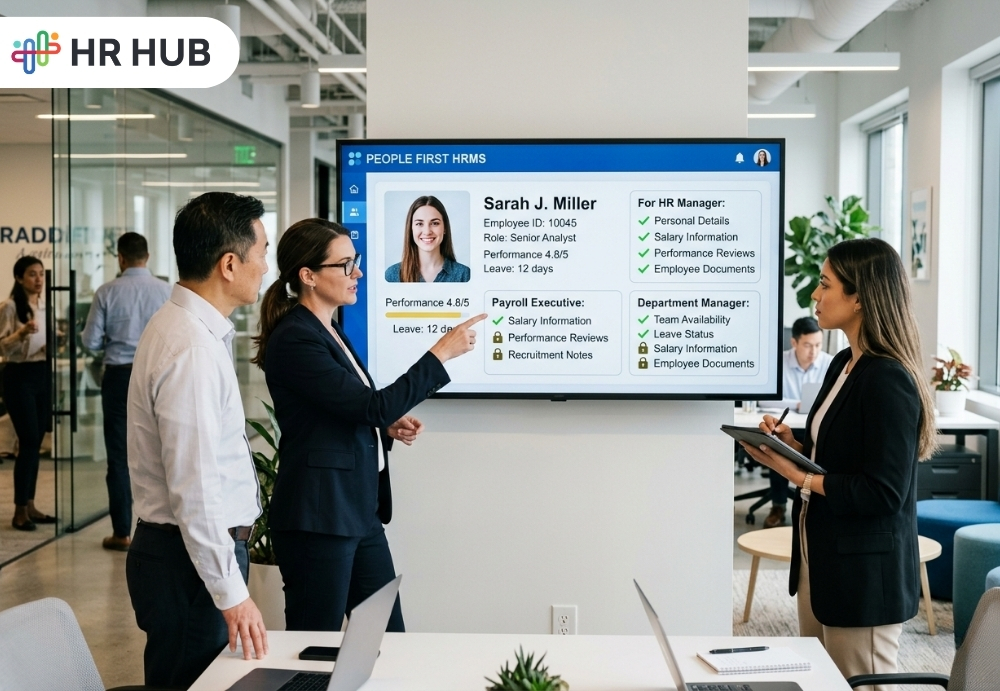
It means users get access based on their role in the organization. An employee gets employee-level access. A manager gets manager-level access. A payroll officer gets payroll-related access. An HR admin gets broader HR access. A system admin gets configuration access.
The point is not to make life difficult. The point is to make access sensible.
For example:
- An employee should be able to view their own payslip, leave balance, attendance, profile details, and submitted requests.
- A reporting manager should be able to view team attendance, approve leave, review requests, and see employee information relevant to their team.
- A payroll user should be able to access salary components, deductions, reimbursements, tax details, and pay run information.
- An HR admin may need access to employee records, workflows, onboarding, exits, documents, and compliance reports.
- A company administrator may need to control settings, permissions, and system configuration.
This is where user permissions for HRMS settings become important. They help define exactly what each role can view, add, edit, approve, reject, download, or configure.
Without this structure, access becomes messy. And messy access in HR is not like a messy desk. A messy desk may hide a stapler. Messy access may expose employee bank details.
Why HR Access Control Is Really About Trust in Employee Data
Employees trust HR with personal information they would not casually share with everyone in the office.
They share bank account details because salary needs to be processed. They share identity documents because compliance requires it. They share family information for benefits or emergency records. They share tax declarations, medical-related documents, addresses, performance concerns, and sometimes deeply personal employment situations.
That trust should not disappear once the data enters the software.
Employee data access control helps protect trust. It makes sure that employee information stays visible only to the people who have a valid reason to use it.
This matters because one access mistake can create discomfort inside the workplace. Imagine a manager seeing compensation details they should not see. Imagine an employee discovering another employee’s appraisal notes. Imagine a branch user downloading a company-wide salary report by accident.
Even if nobody misuses the information, the damage is already done. People start asking uncomfortable questions. HR has to explain. Leadership gets involved. The system loses credibility.
Strong access control prevents those situations before they become awkward in meeting-room conversations.
The “Everyone Is Admin” Problem: Risks for HR Software Security
Many companies fall into this trap, especially when they are growing fast.
First, there were only a few people using the HR system. Someone says, “Give me full access for now. I just need to check something.” Someone else needs help with payroll, so they also get admin rights. A manager needs a report urgently, so access is expanded. Temporary permission becomes permanent because nobody remembers to remove it.
Slowly, the HRMS turns into a place where too many people can do too many things.
The problem is not always bad intentions. Often, it is convenient. But convenience can be expensive when sensitive employee data is involved.
Admin access should never be treated like office Wi-Fi password sharing.
A strong role-based access control HR setup keeps permissions tied to real responsibilities. If someone changes roles, their access should change. If someone moves departments, their visibility should be reviewed. If someone leaves the company, their access should be removed immediately. If someone needs temporary access, there should be a reason and a review.
Access should follow the person’s job, not their past privileges.
Where Role-Based Access Control HR Matters Most in HRMS Security
Role-based access control should not sit in one corner of the HRMS. It should work across the entire system because employee data moves through many modules.
Employee Information
The employee profile is the heart of an HRMS. It can include personal details, job information, bank details, emergency contacts, documents, reporting structure, work location, employment history, and status changes.
This information should be carefully protected.
An employee may update their own contact details. HR may verify and approve changes. A manager may view limited team information. Payroll may need bank and salary-related details. A branch HR user may only need access to employees from one location.
The system should support these boundaries clearly.
Payroll
Payroll is one of the most sensitive parts of HR software. It includes salary, bonuses, deductions, tax details, reimbursements, bank information, payslips, contributions, and statutory records.
A payroll user may need broad payroll access, but that does not mean every HR user or manager should see everything. Employees should only access their own payslips and tax records. Finance may need payment summaries, not every personal detail inside the HRMS.
This is one of the strongest reasons why HR software security should include detailed payroll permissions.
Leave and Attendance
Leave and attendance may look harmless compared to payroll, but they can still reveal personal patterns. Long absences, late marks, overtime, work schedules, and leave types can say more than people realize.
A manager should be able to approve leave for their team. HR may need wider access for policy checks. Payroll may need approved attendance data for salary processing. Employees should see their own records.
Simple, clear access rules keep this clean.
Performance Reviews
Performance data can affect increment, promotions, training plans, role changes, and employee confidence.
Draft ratings, manager comments, HR remarks, final scores, and development feedback should not be visible to the wrong people. If performance data leaks internally, it can create tension very quickly.
Role-based permissions help protect the review process and keep sensitive feedback in the right hands.
Recruitment and Onboarding
Recruitment data can include resumes, interview feedback, expected salary, offer letters, background checks, joining documents, and personal candidate details.
A hiring manager may need interview feedback and candidate status. An interviewer may only need evaluation access. HR may need to offer and onboarding details. Payroll may only need data after the candidate joins.
Good user permissions for HRMS features allow each person to do their part without exposing unnecessary information.
Reports and Analytics
Reports are powerful because they bring a lot of data together. That also makes them risky.
A user may not have access to payroll screens but may still see salary data through a report if permissions are not set properly. Someone may not be able to open performance reviews but may download rating summaries from analytics.
Report-level access control is a must. Organizations should decide who can view, generate, export, or share each report.
Access Control Also Makes Your HRMS Easier to Use with Proper User Permissions HRMS
Good access control is not only about security. It also improves user experience.
When employees log in, they should not see ten modules that mean nothing to them. They should see what they need: payslips, leave, attendance, policies, requests, documents, and profile details.
When managers log in, they should see team actions: approvals, attendance exceptions, leave requests, performance tasks, and employee information relevant to their team.
When payroll users log in, they should see payroll inputs, salary structures, tax declarations, deductions, pay runs, and payroll reports.
This makes the system easier for everyone.
Too much access creates confusion. People click the wrong things, ask unnecessary questions, and sometimes change something they did not mean to touch. In HR software, “I was just checking” is not a great explanation after the wrong field gets updated.
Controlled access keeps the interface cleaner and the work more focused.
Why This Matters for Businesses Across India, Cayman Islands, US, and Canada: Employee Data Access Control in Practice
Companies today are not all working from one office with one HR person and one spreadsheet.
A business may have employees in India, managers in Canada, payroll users in the Cayman Islands, leadership in the US, and remote staff spread across multiple time zones. HR processes may vary by country, department, entity, or employee type.
That means access control must be flexible.
A location HR user may need access only to employees in one country. A department manager may need visibility only for their reporting team. A payroll user may need access only to payroll data for a specific region. Leadership may need summary reports without access to every personal employee document.
This is why employee data access control should support real business structures. It should not force every company into one fixed access model.
The HRMS should allow access based on role, department, location, reporting hierarchy, module, action type, and approval of responsibility.
That is how businesses can grow without turning HR access into a guessing game.
Workflows and Access Control Are Better Together for HR Software Security
Access control decides what a user can do.
Workflow decides where the request goes next.
Both are important.
For example, an employee may submit a leave request. The reporting manager may approve of it. HR may review special cases. Payroll may use approved leave data for salary processing.
Similarly, an employee may update bank details. HR may verify the change. Payroll may use the approved information in the next pay cycle.
The employee should not be able to approve their own request. The manager should not be able to change payroll settings without authorization. The payroll user should not randomly edit personal records unless their role allows it.
When workflows and permissions work together, HR operations become safer and more accountable. It also helps during audits because the organization can show who submitted, who approved, who changed, and who finalized a record.
The Audit Question Nobody Wants to Hear: Role-Based Access Control HR Keeps You Covered
During an audit or internal review, someone may ask:
- Who can access employee salary details?
- Who can edit bank information?
- Who can approve attendance changes?
- Who can download payroll reports?
- Who assigned admin access to this user?
- Was access removed when the employee changed roles?
These questions sound simple until the answer is, “We think only HR has access.”
“We think” is not a great audit strategy.
A secure and safe HRMS security should help answer these questions clearly. Proper role-based permission, access logs, approval trails, and regular review make it easier to prove that access is controlled.
This is especially useful for companies preparing compliance checks, ISO-related reviews, internal governance, client audits, or data privacy assessments.
HR software security is much easier to defend when the system has clear access rules and records.
For companies that want stronger HR software security, access control should work together with compliance with workflows, audit trails, and data privacy practices. You can explore this further in HR HUB’s guide on HR Compliance Software: Managing Risk with AI and Automation in the Digital Age.
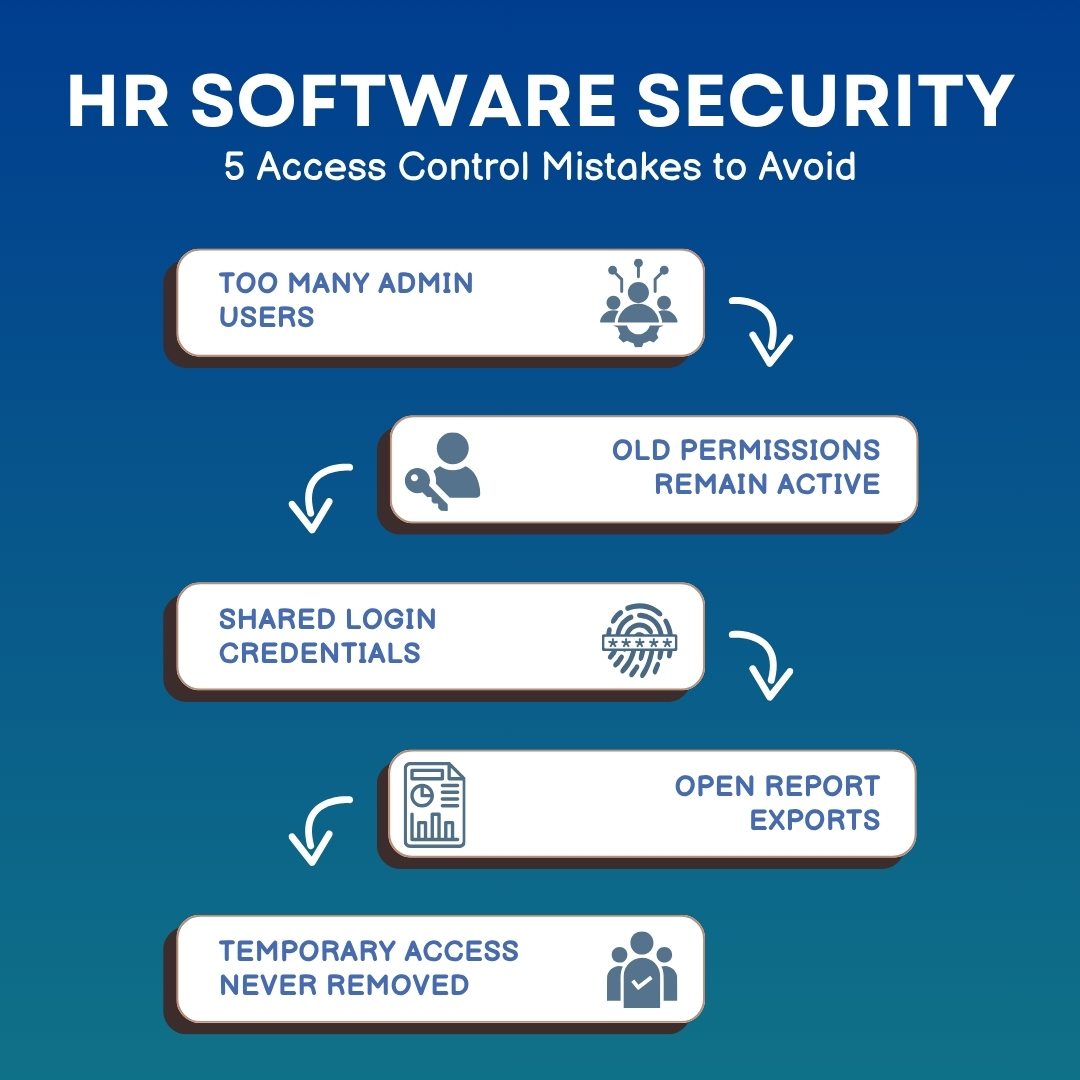
These mistakes are avoidable when the organization treats access as an ongoing responsibility, not a one-time setup activity.
What a Good HRMS Permission Setup Should Include for Effective User Permissions HRMS
A strong HRMS should allow organizations to manage access in a practical way.
It should include role-based permissions, module-level controls, action-based rights, employee visibility rules, report permissions, workflow authority, approval restrictions, and activity logs.
It should also support access based on location, department, business unit, employee type, reporting hierarchy, and country-specific operations.
For example, a payroll user may process only one entity. A manager may access only direct reports. A regional HR admin may manage only one location. A global HR head may see broader reports. A system admin may manage configuration but may not need to view every payroll detail.
The best access model is not “lock everything” or “open everything.” It is “give the right access to the right person for the right reason.”
Simple sentences. Big impact.
Why Growing Companies Should Fix Role-Based Access Control HR Early
Access problems become harder to fix as the company grows.
In a small team, people may remember who has access to what they have. In a larger organization, that memory-based method falls apart quickly. New employees joined us. Managers change. Departments split up. Payroll teams are expanding. New locations are open. Admin users are added. Old users leave.
Without structure, access control becomes a pile of exceptions.
That is why companies should define permissions early. It is much easier to build clean access rules before the HRMS becomes heavily used across departments and regions.
A company that sets up role-based access properly from the start saves itself from future confusion, risk, and uncomfortable conversations.
How HR HUB Helps Businesses Manage Secure Role-Based Access Control HR
HR HUB helps organizations manage HR operations with controlled access, role-based permissions, workflow approvals, employee self-service, manager visibility, and structured HR modules.
The platform allows businesses to define who can access specific modules, what actions users can perform, which records they can view, and how requests should move through approval flows. This helps HR teams protect sensitive employee data while keeping daily work simple for employees, managers, payroll users, and administrators.
For businesses in India, Cayman Islands, US, and Canada, HR HUB supports the need for secure, organized, and practical HR operations. Whether a company is managing attendance, payroll, leave, onboarding, employee records, performance, or reports, access control plays a major role in keeping the system trustworthy.
HR HUB is not only about storing employee data. It helps businesses manage that data responsibly.
The Final Access Check: Ensuring Employee Data Access Control in Your HRMS
Role-based access control may not sound as exciting as a new dashboard or a colorful analytics chart. Nobody walks into a meeting saying, “Great news, our permission structure looks beautiful today.”
But when something goes wrong, access control suddenly becomes everyone’s favorite topic.
That is why role-based access control HR should be treated as a core part of HR software, not a background setting. It protects employee privacy, supports compliance, reduces internal risk, improves accountability, and makes the HRMS easier for people to use.
In HR, the right access is not about hiding information. It is about respecting information.
Employees deserve to know their personal data is protected. Managers deserve clear access to the information they need. HR teams deserve a system that supports control without creating daily headaches. Businesses deserve software that grows with them without opening the wrong digital doors.
And that is exactly why role-based access control matters in HR software.