The performance review is going well. The employee has taken on more responsibility, delivered consistently, and earned positive feedback from the manager. After reviewing performance and compensation, management approves a salary increase.
For the employee, the message is simple: your salary is being revised.
For HR, that is where the work begins.
- What is the revised salary?
- When does it become effective?
- Which pay components are changing?
- Who approved the revision?
- Has payroll received the updated information?
- Does the employee need a revision letter?
- And what happens to the salary that was applicable before the change?
These questions become particularly important when salary revisions happen in the middle of the year rather than during one organization-wide appraisal cycle.
One employee may receive an increment in April. Another may be promoted in July. Someone else may receive a market adjustment in September. By December, HR is no longer managing one salary revision exercise. It manages a history of compensation decisions made at different times and for different reasons.
That is where salary revision software becomes useful. The purpose is not simply to replace an old salary with a new one. A structured salary revision process should help HR preserve what changed, when it changed, why it changed, who approved it, and how that decision reached payroll.
Because today's salary tells HR what to pay, and history tells HR how that salary got there.
Salary Changes, But Several Records May Be Affected
Imagine an employee receiving a promotion following a performance review. Their monthly compensation changes from 50,000 to 58,000, effective July 1. One figure has changed, but that decision may touch several HR activities:
- The employee's compensation record needs to be updated.
- The previous salary should remain part of the employee's salary history.
- Revised salary components may need to be recorded.
- The approval should be traceable.
- Payroll needs to know when the new amount takes effect.
- Any applicable arrears need to be considered.
- The employee needs to receive the correct communication.
- Reports should reflect the revision accurately.
- The performance or appraisal decision may need to remain connected to the outcome.
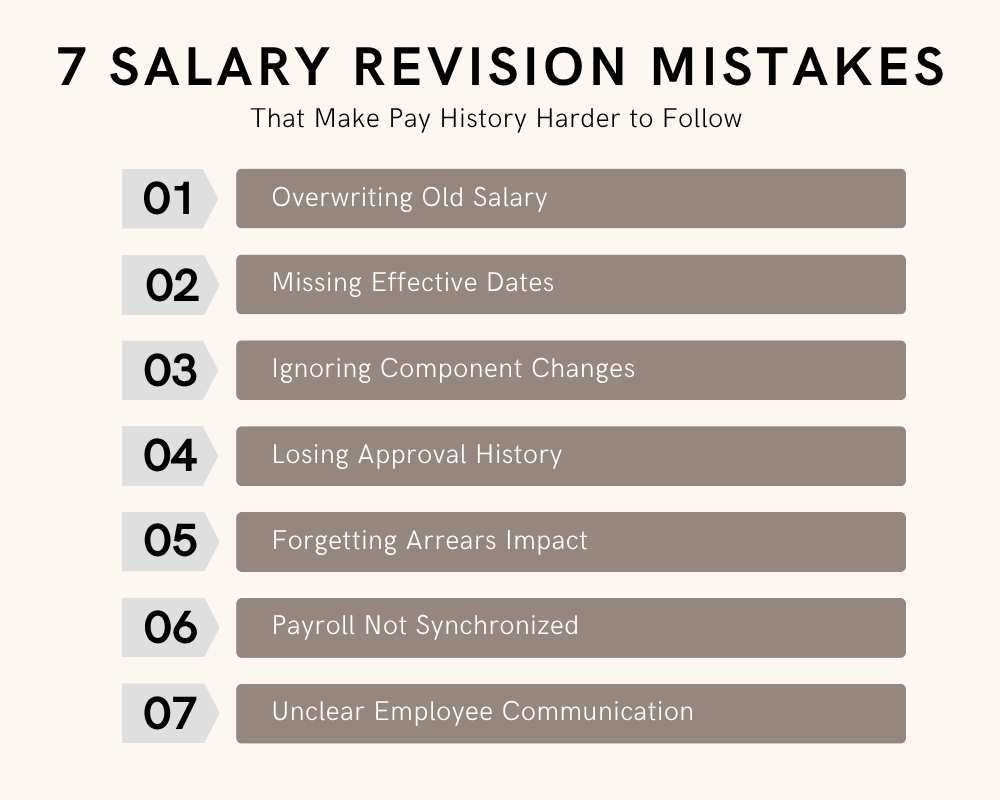
This is why salary increment management should not be reduced to editing a field in an employee profile. If the old amount is simply overwritten, HR may know what the employee earns today but lose valuable context about what the employee earned before, when it changed, and why.
That becomes increasingly difficult as employees receive multiple revisions over several years.
Effective Date Is More Important Than It Looks
Every salary revision needs a point in time when the new compensation becomes applicable. Consider two employees whose revised salary is approved on August 15.
1.For the first employee, the revision is effective September 1.
2.For the second, management has approved the revision retrospectively from July 1.
The approval dates may be similar, but the payroll consequences are very different. That is why the effective date should be a central part of the salary revision process, rather than an informal note added after the decision.
Salary revision software can help HR maintain the relationship between the previous amount, revised amount, and the date on which the change takes effect. Without that clarity, payroll may be left asking whether the new amount should apply to the current period, next period, or an earlier one.
Approval History Answers the Question: "Who Authorized This?"
Salary revisions usually have a reason behind them. An employee may receive an increment after an appraisal. Another may receive a salary adjustment after moving into a new position. Someone else may receive a market correction outside the normal appraisal cycle.
Whatever the reason, compensation changes are important enough to require clear authorization. A practical salary revision process may move through stages such as: Recommendation → Review → Approval → Effective Date → Payroll Update → Employee Communication
The exact workflow will differ between organizations, but the principle is important. The final salary should not become disconnected from the decision that created it.
With salary revision software, HR can manage compensation changes more systematically so that a later review does not depend entirely on someone finding an old email or remembering a conversation from months earlier.
Performance and Salary Revisions Are Connected
Performance reviews frequently influence salary decisions, but the two processes should not be treated as identical.
An appraisal may show how an employee performs against objectives, competencies, responsibilities, or agreed expectations. A compensation decision answers a different question: what change, if any, should be made to the employee's pay?
That distinction matters.
Not every strong performance rating automatically results in the same percentage increase. Budgets, role changes, internal compensation structures, market considerations, and organizational policies may also influence the final decision.
This is where connecting Performance Management with salary increment management can be useful.
HR can retain the performance context while still treating the actual compensation change as a controlled decision with its own amount, components, effective date, and approval.
Compensation management software becomes particularly valuable when organizations want greater consistency between these related processes without reducing performance management to a salary discussion.
What If the Revision Is Effective Before It Is Processed?
This is where salary revisions can become more complicated. Suppose management approves a revised salary in August but decides that it should be effective from July.
July payroll has already been processed using the old salary.
Depending on the organization's payroll rules and applicable requirements, HR and payroll may now need to identify the difference between what was originally paid and what should have applied under the revised compensation.
That difference may result in an arrears calculation where applicable. This is another reason that salary revision software should work closely with payroll processes. The salary change itself is an HR decision. Its financial effect belongs to payroll.
If those hiring processes are disconnected, HR may maintain the correct revised salary while payroll continues using an older amount, or payroll may receive the new figure without enough information about its effective date.
Effective salary increments management needs both sides of the process to agree on when the revision applies.
Payroll Should Not Have to Discover Salary Changes
One of the easiest ways to create payroll confusion is to manage salary revisions through informal communication.
- The manager approves an increase.
- HR updates a spreadsheet.
- Someone sends payroll emails.
- Another version of the spreadsheet is shared.
- Payroll is generated.
Then someone asks, "Was Priya's revised salary included this month?"
The problem is not necessarily calculation. It is the handoff. When salary revision software is part of a connected HR and payroll environment, approved compensation information can become easier to follow from the employee's record into the payroll process.
This is where compensation management software should support more than planning salary increases. It should help keep compensation decisions structured enough that payroll can work from reliable information.
Employee Communication Should Match the System Record
Imagine receiving an increment letter saying your new salary takes effect on July 1, only to find that the system reflects August 1.
Or the salary letter shows one figure while payroll uses another. Even when the difference results from a simple administrative mistake, it can quickly create questions about pay.
Once the salary revision process is approved, employee communication should align with the information maintained by HR and payroll. Depending on company practice, communication may include:
- Previous compensation.
- Revised compensation.
- Effective date.
- Revised designation or role, where relevant.
- Applicable salary components.
- Reason or context for the change, where appropriate.
- Other terms associated with the revision.
The objective is simple: the employee, HR record, approval, and payroll should tell the same story.

Salary History Should Be a Timeline, Not a Mystery
Consider an employee who has worked with the organization for five years.
They joined at one salary, received an increment after the first appraisal, another after a promotion, a market adjustment the following year, and another revision during the most recent performance cycle.
The current salary tells you where the employee is now.
The employee salary history tells you how they arrived there.
A useful history might show:
January 2022: Joining salary
April 2023: Annual increment
October 2023: Promotion revision
April 2024: Performance increment
January 2025: Market adjustment
July 2026: Mid-year salary revision
That timeline can provide valuable context for HR reviews, reporting, compensation planning, and future decisions.
This is one of the most practical reasons for using salary revision software. New information can be recorded without making previous compensation information disappear.
Good employee salary history should preserve the sequence of changes rather than turning every revision into an overwrite.
What Should Salary Revision Software Keep Traceable?
When evaluating salary revision software, do not stop whether HR can change an employee's salary. Ask whether the system helps preserve the story around the change. HR should be able to understand:
- The earlier compensation should remain available for historical reference.
- The approved new amount and applicable components should be clear.
- Every revision should have an effective date.
- The revision should have appropriate context, such as appraisal, promotion, or another approved reason.
- The approval audit trail should remain identifiable.
- The revised compensation should reach the appropriate payroll period.
- Backdated revisions may need further payroll consideration where applicable.
- Communication should reflect the approved information.
These capabilities turn the salary revision process from simple data to edit into a traceable HR activity.
Salary Changes, History Should Not Disappear
There is nothing unusual about an employee's salary change. People develop. Responsibilities are growing. Promotions happen. Performance is recognized. Organizations adjust compensation. Careers move forward. What creates difficulty is losing history each time that happens.
Good salary increment management should allow HR to move an employee onto their revised compensation without disconnecting them from the salary records that came before it.
That is the real value of salary revision software.
HR HUB connects Employee Pay Master, Payroll, Performance Management, Employee Information, and Reports so that important compensation information can remain part of the wider employee record.
Record the revision. Keep the effective date clear. Maintain the previous salary. Follow the approval. Connect the change with payroll. Preserve the employee salary history.
Because six months after an increment, HR should not need to search through spreadsheets and emails to understand what happened.